Updated
Wydely helps e-commerce teams plan WhatsApp campaigns and follow-up workflows. Start with an eligible audience and a clear customer action, then measure delivery, responses and attributable purchases separately.
The ten ideas below are examples for D2C and e-commerce teams. Confirm customer permission, the supported store event and the appropriate message template before testing any campaign. Define a useful customer action and measure it before expanding the audience.
Measure the customer journey
Measure each stage separately: message outcome, customer response, link visit and attributable purchase. Define the audience and reporting period, exclude internal tests and reconcile the purchase event before reporting campaign revenue.
Why use WhatsApp for e-commerce conversations?
WhatsApp gives customers a place to ask about products and respond to a relevant update. A campaign can open a conversation; it does not guarantee a read, a reply or a purchase.
Plan who will handle questions about sizing, payment and delivery. Review the campaign workflow, supported integrations and plan limits and charges before choosing the setup for your store.
10 WhatsApp Campaign Ideas for E-Commerce
Abandoned Cart Recovery Campaign
If your store integration supports checkout events and the recipient has given marketing permission, test a reminder after an appropriate delay. Use a valid checkout link, stop reminders after purchase and compare completed purchases with your current approach.
Flash Sale Broadcast
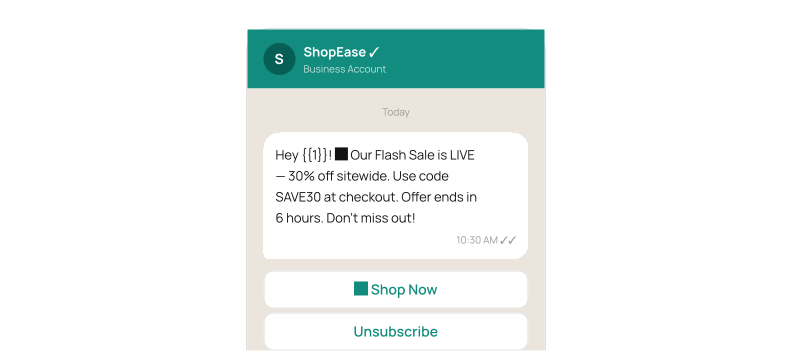
Share a genuine offer with an eligible audience. State its end date and exclusions clearly, and prepare your team to answer replies. Measure link visits and purchases separately from message delivery.
COD Confirmation & Upsell Flow
Test an order-confirmation message using supported order events and response handling. Keep confirmation separate from promotional content, and confirm the applicable template category before adding an upsell.
Post-Purchase Review Request
Choose a suitable time after confirmed delivery and invite feedback with an eligible message. Link to your review page or provide a clear way to reply. Test that delivery data and recipient permission are available.
Loyalty & Repeat Purchase Nudge
Use supported purchase data to select an eligible customer segment. Explain any loyalty offer accurately and honor opt-outs before sending another update.
New Product Launch Campaign
Introduce a product to recipients who asked for marketing updates. Use supported media and a clear product link, then track the customer action your campaign is intended to support.
Festive Season Broadcast (Diwali, Eid, New Year)
Prepare a relevant seasonal message for an eligible audience. Check timing, language, offer details and opt-outs; measure results instead of assuming a seasonal message will drive sales.
Referral Program Invite
If your business has a referral program, explain its terms and share a valid link with eligible recipients. Avoid asking customers to send unsolicited messages to other people.
Re-engagement Campaign for Inactive Customers
Define inactivity using reliable purchase or interaction data. Test a relevant update only where permission still applies, limit follow-up frequency and stop when the customer opts out.
Click-to-WhatsApp Ad Follow-Up
Use an ad enquiry to start a relevant conversation. Configure a chatbot workflow for supported questions and a handoff to your team. Track ad clicks, conversations and verified purchases as separate outcomes.
Example of WhatsApp Broadcast Message
Getting Started with WhatsApp Campaign Tools on Wydely
Prepare campaigns for recipients who have given permission, use the appropriate templates and monitor account quality. Official API access does not remove the possibility of account restrictions. Follow the WhatsApp Business Messaging Policy and check the sending status in your account.
Use Wydely campaign tools to prepare your audience and message. Confirm supported store events in the integration guide, and test one customer journey before scheduling a larger campaign.
FAQs
Can I personalize messages for thousands of customers at once?
Wydely campaign templates can use customer-specific variables. Validate your audience, variable values, template approval, consent and account limits before scheduling a campaign.
Will my number get banned if I send bulk marketing messages?
No provider can guarantee that a number will avoid restrictions. Follow current WhatsApp policies, message recipients who have given permission, honor opt-outs and monitor account quality.
Can I track direct sales revenue from WhatsApp campaigns?
Use tagged links and a configured analytics or store integration to relate campaign visits to purchases. Message delivery or read counts alone do not establish revenue attribution; test the purchase event and attribution rules before reporting sales.