
<style>.reveal{opacity:1!important;transform:none!important}.faq-body{display:block!important;max-height:none!important}</style>
Official Meta Tech Provider

No-Code WhatsApp Chatbot Builder for Leads & Support

Turn common questions into helpful conversations. Design visual flows that collect lead details, answer FAQs, and bring in your team when it matters.
  • Visual flow builder
  • Lead capture
  • Team handoff
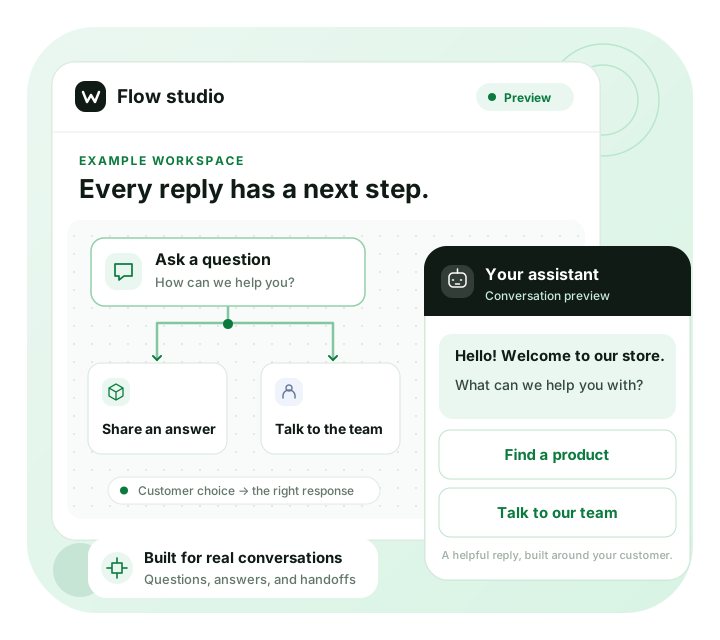
Example visual chatbot builder branching from a welcome message to a prepared answer or team handoff
Illustrative workflow · Built around your business
Thoughtful automation

A better answer starts with a better flow.

Arrange messages, questions, and conditions visually. Connect your flow to your WhatsApp Business API account.

Build multi-step journeys

Guide customers through FAQs or lead qualification with a visual, branching conversation flow.

Connect the next step

Link workflows, trigger follow-ups, or pass the conversation to a teammate based on a customer’s reply.

Capture useful context

Save replies to contact fields and use tags and assignments to prepare your team for follow-up.

From first hello to human follow-up

A helpful reply. A clear next step.

Ask the right questions before your team joins the conversation. Start with a focused flow and keep a clear path to a person.
  • Offer quick replies to guide the conversation
  • Collect the details your team needs
  • Hand off with context for a smoother follow-up
See a workflow in action
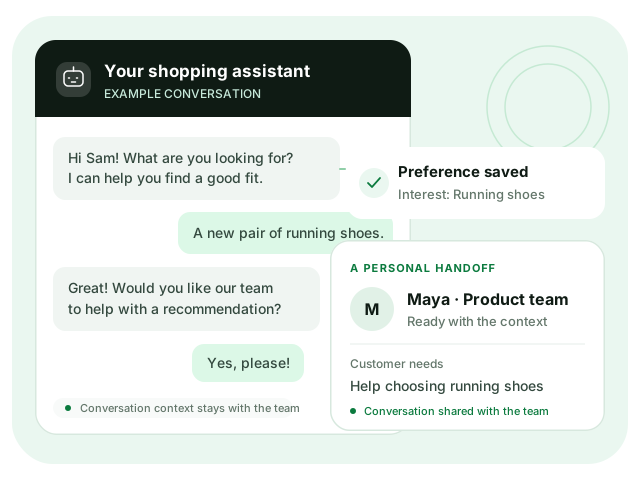
Example chatbot conversation capturing a customer preference and passing it to the support team
Illustrative workflow · Built around your business
Built around your customers

Start with one useful conversation.

Choose a workflow for a real customer need, then build from there.

01

Welcome & qualify

Turn an enquiry into a useful first conversation.

  • Lead qualification
  • Call scheduling
02

Guide the next purchase

Help customers find the next step in their buying journey.

  • Order assistance
  • Reminders
03

Answer & support

Make common questions easy to answer and people easy to reach.

  • FAQs
  • Order status
  • Team handoff
04

Stay in touch

Keep the conversation useful after a purchase.

  • Feedback
  • Referrals

Order, scheduling, and other business-specific workflows may need additional data or integrations. We can help you review the requirements.

Build, test, launch

Your first flow, step by step.

Connect your account, build a focused workflow, and test every path before publishing.

  1. 01

    Connect WhatsApp

    Connect your business account and complete any required account or number verification.

  2. 02

    Choose a starting point

    Select an available starter flow or begin with a blank canvas for your use case.

  3. 03

    Build your flow

    Add messages, quick replies, forms, conditions, and media in the visual builder.

  4. 04

    Test and refine

    Preview each conversation path and fine-tune the responses before going live.

  5. 05

    Publish and improve

    Launch your tested flow, monitor conversations, and adjust the workflow as needed.

Build it your way

A little guidance goes a long way.

Start with the visual builder, or work through your conversation flow with our team.

Build your own chatbot

Arrange your messages, test the responses, and publish when your flow is ready.

Start Building Free

Plan with our team

Review your workflow, required data, and integration needs in a guided demo.

Talk to an Expert
Your next conversation starts here

Make your next conversation more helpful.

Build a WhatsApp chatbot around your lead-capture or support process. Start with one clear workflow.

Official Meta Tech Provider · Guided onboarding