
Creating a WhatsApp Click-to-Chat URL is one of the fastest ways to let customers message your business without saving your phone number. You can generate a WhatsApp link for free in just a few seconds using the official Click-to-Chat format or a WhatsApp link generator, then share it on your website, social media profiles, emails, ads, QR codes, and more.
Instead of asking customers to copy your number, save it, open WhatsApp, and search for your contact, a single click opens a chat with your business instantly. In 2026, removing these extra steps is necessary for improving conversions and reducing customer drop-offs. If you're looking for a complete WhatsApp Marketing Software, Wydely helps businesses automate customer conversations, broadcasts, and lead management from one platform.
What Is a WhatsApp Click-to-Chat Link?
A WhatsApp Click-to-Chat link is a unique URL that lets customers start a conversation with your business instantly, without saving your phone number first. Built on Meta's official Click-to-Chat feature, the link opens a chat directly in the WhatsApp app or in WhatsApp Web on any device. With a single click, users are taken straight to your chat, making it faster and easier to connect with your business. For official implementation details, refer to Meta's Click-to-Chat documentation.
How to Create a WhatsApp Link Manually
If you only need a basic link, you can actually construct one yourself by following Meta's standard URL syntax.
Basic Format: wa.me/[phone number]
The foundation of any direct link uses the secure https://wa.me/ domain followed immediately by your full international phone number.
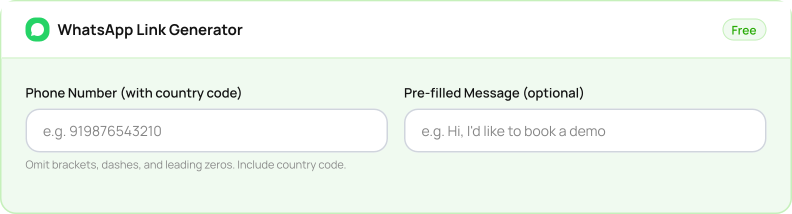
When entering your number, omit any brackets, dashes, symbols, or leading zeros. You must include the country code.
For example, if your business number is in India (country code +91) and your number is 9876543210, your basic URL will look exactly like this:
https://wa.me/919876543210
Adding a Pre-filled Message
To make it even easier for users to reach out, you can append a pre-filled message that appears automatically in their text entry box. This saves the customer from typing out an introductory phrase and lets you know exactly where that lead came from.
To add a message, you attach ?text= to your link, followed by your message. Because URLs cannot contain blank spaces, you must use URL encoding, replacing spaces with %20. If you want the message to read "Hello, I want more details," the manual format looks like this:
https://wa.me/919876543210?text=Hello,%20I%20want%20more%20details
Use Our Free WhatsApp Link Generator
How to Use WhatsApp Direct Message Links on Your Website
Once you've generated your WhatsApp Click-to-Chat URL, add it to visible touchpoints across your website, such as "Chat on WhatsApp" buttons, chat widgets, product pages, contact pages, and headers or footers. When visitors click the link, WhatsApp opens instantly with your business number and an optional pre-filled message, making it quick and easy to start a conversation.
Adding WhatsApp Links to Instagram, Facebook & Email
WhatsApp direct message links make it easy to turn passive social media views into clients with a single click.
- Instagram & TikTok: Add your WhatsApp link to your bio and use a pre-filled message like "Hi! I'd like a quote for your services" to track inquiries.
- Facebook Ads: Link your CTA button directly to WhatsApp so prospects can start a conversation instantly.
- Email Newsletters: Add a "Chat on WhatsApp" button to give subscribers a faster way to reach your team.
WhatsApp Click-to-Chat URL Best Practices
To ensure your link strategy delivers the highest conversion rate possible, stick to these core operational rules:
Always Double-Check the Country Code
Omitting the country code or keeping a placeholder zero will cause a fatal routing error, leading users to a dead end.
Set Clear Expectations
Ensure the surrounding text or button icon clearly states that clicking will open the WhatsApp app.
Keep Messages Brief
Pre-filled texts should be short, natural, and phrased from the customer's perspective (e.g., "Hi, I'd like to book a demo").
How Wydely Supercharges Click-to-Chat with Automation
A free link is a great way to start conversations, but if hundreds of users click your link simultaneously, your team can quickly become overwhelmed.
This is where a unified platform changes the game. By linking your customer touchpoints to Wydely, incoming clicks transition into intelligent, automated workflows. Explore Wydely's WhatsApp automation features to automate replies, lead qualification, and customer engagement. When a user clicks your link and sends the pre-filled message, your custom WhatsApp Chatbot instantly processes the incoming query. Instead of making customers wait for a response, you instantly qualify leads, share your product catalog, answer common questions, and trigger automated conversation flows. Businesses using the WhatsApp Business API can automate replies, send notifications, and manage customer conversations at scale.
FAQs on WhatsApp Link Generator
Does Wydely's WhatsApp Link Generator cost anything?
No. You can generate WhatsApp Click-to-Chat links for free.
Do these links work globally on any device?
Yes. If a user clicks it on an Android or iOS device with WhatsApp installed, the app opens natively. On desktops, it opens via WhatsApp Web or the WhatsApp desktop app.
Can I hide my phone number inside the link?
No. The phone number is part of the wa.me URL, but you can route your link through a standard URL shortener (like Bitly).