
Make every campaign relevant
Choose opted-in audiences, personalize approved templates, and schedule messages for the right moment.
Bring campaigns, customer conversations, and automation together. Connect your business to WhatsApp with a workspace your whole team can use.
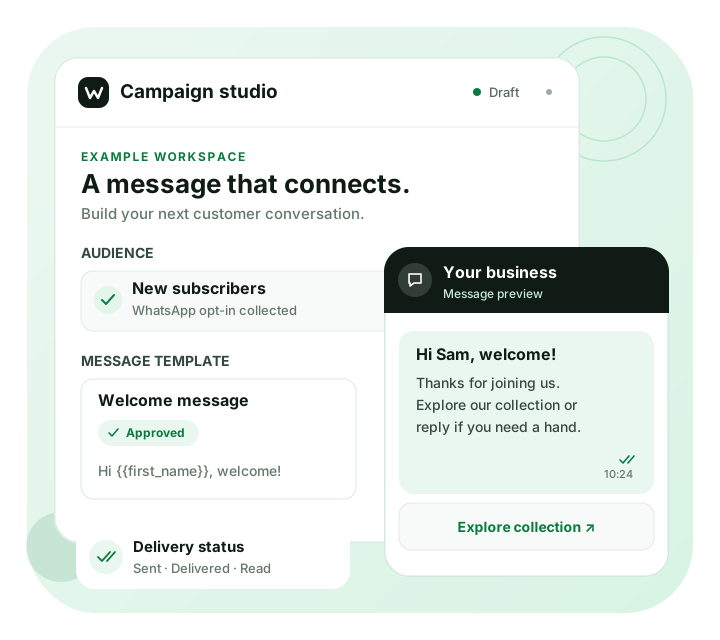
Move from your first campaign to the next reply with tools that work together.
Choose opted-in audiences, personalize approved templates, and schedule messages for the right moment.
Follow up on click-to-WhatsApp ad enquiries and collect details before your team takes over.
Assign conversations to teammates and keep customer messages organized in one workspace.
Build reply and qualification flows with the visual WhatsApp chatbot builder.
Use contact tags and attributes to organize details and prepare relevant campaign audiences.
Review delivery, read status, and recipient history to understand how your messages perform.
A campaign is only the beginning. Give your team the customer context they need to pick up the next reply.
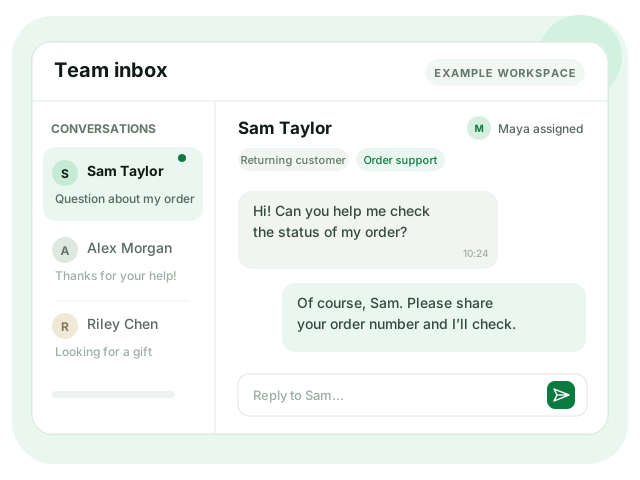
A clear view of what you can do with Wydely and what to prepare before you launch.
| Your workflow | With Wydely | Before you start |
|---|---|---|
| Campaigns | Personalized template messages | Recipient opt-in and approved templates |
| Team conversations | A shared inbox with assignments | A connected business number and agent access |
| Chatbot flows | Visual messages, questions, and branches | A tested conversation flow |
| Contact organization | Tags and contact attributes | Relevant customer details |
| Scheduled sending | Campaigns prepared for a later time | An eligible audience and account |
| Message reporting | Delivery, read status, and recipient history | Available message-status data |
| Human follow-up | Conversations assigned to teammates | A staffed escalation path |
Messaging is subject to your account limits and WhatsApp’s messaging policy. Use approved templates where required and give customers a clear way to reach your team.
Prepare your business details and number. Setup depends on account eligibility and any required Meta reviews.
Link your Facebook Business Manager account to begin your WhatsApp Business API setup.
Create a new WhatsApp Business Account or link your existing one with guided setup.
Verify your number, confirm account readiness, and prepare approved templates for your first campaign.
See how Wydely fits your campaign and customer-support workflows. We’ll walk you through the setup.