

Indian D2C brands can sell products directly on WhatsApp using multi-product catalog messages, reducing the need to send customers to external websites.
Instead of moving customers from social media or WhatsApp to a website, brands can showcase multiple products directly in the chat. Customers can browse product collections, compare options, and continue their purchase without leaving WhatsApp. This chat-based shopping experience can help D2C and retail brands reduce drop-offs and make it easier for customers to buy.
Quick Answer: How do multi-product catalog messages work?
WhatsApp's multi-product catalog messages enable businesses to display up to 30 products at once in a single interactive chat message. Customers can browse organized collections, view item details, add products to an in-app cart, and complete orders without ever leaving the conversation window.
What Multi-Product Messages Unlock (Up to 30 Products Per Conversation)
Unlike legacy broadcast templates that rely on single static images or external links, interactive multi-product messages deliver a full digital catalog directly inside the user interface.
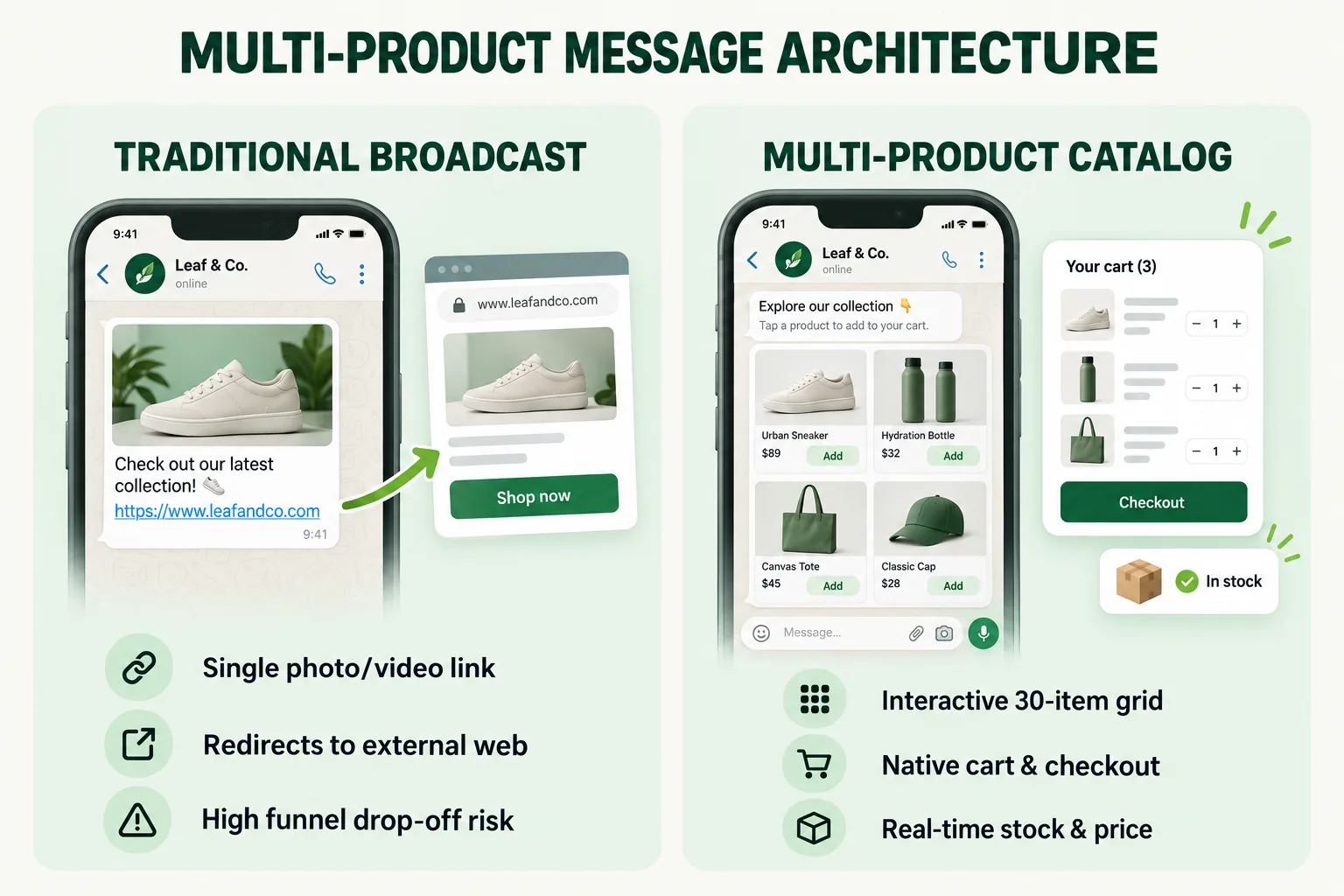
- Sectioned Product Layouts: Showcase up to 30 SKUs organized into distinct categories (e.g., "Best Sellers," "New Arrivals," "Festive Combos") inside one message block.
- Real-Time Price & Inventory Updates: Because catalog messages link dynamically to Meta Commerce Manager, product details, stock levels, and promotional pricing stay updated automatically without requiring template re-approval.
- Zero Drop-Off Redirection: Users bypass external landing page loads, allowing immediate purchasing decisions right where they are already chatting.
Building a Chat-Native Shopping Experience
In-chat catalog commerce creates a frictionless path from initial discovery to final purchase.
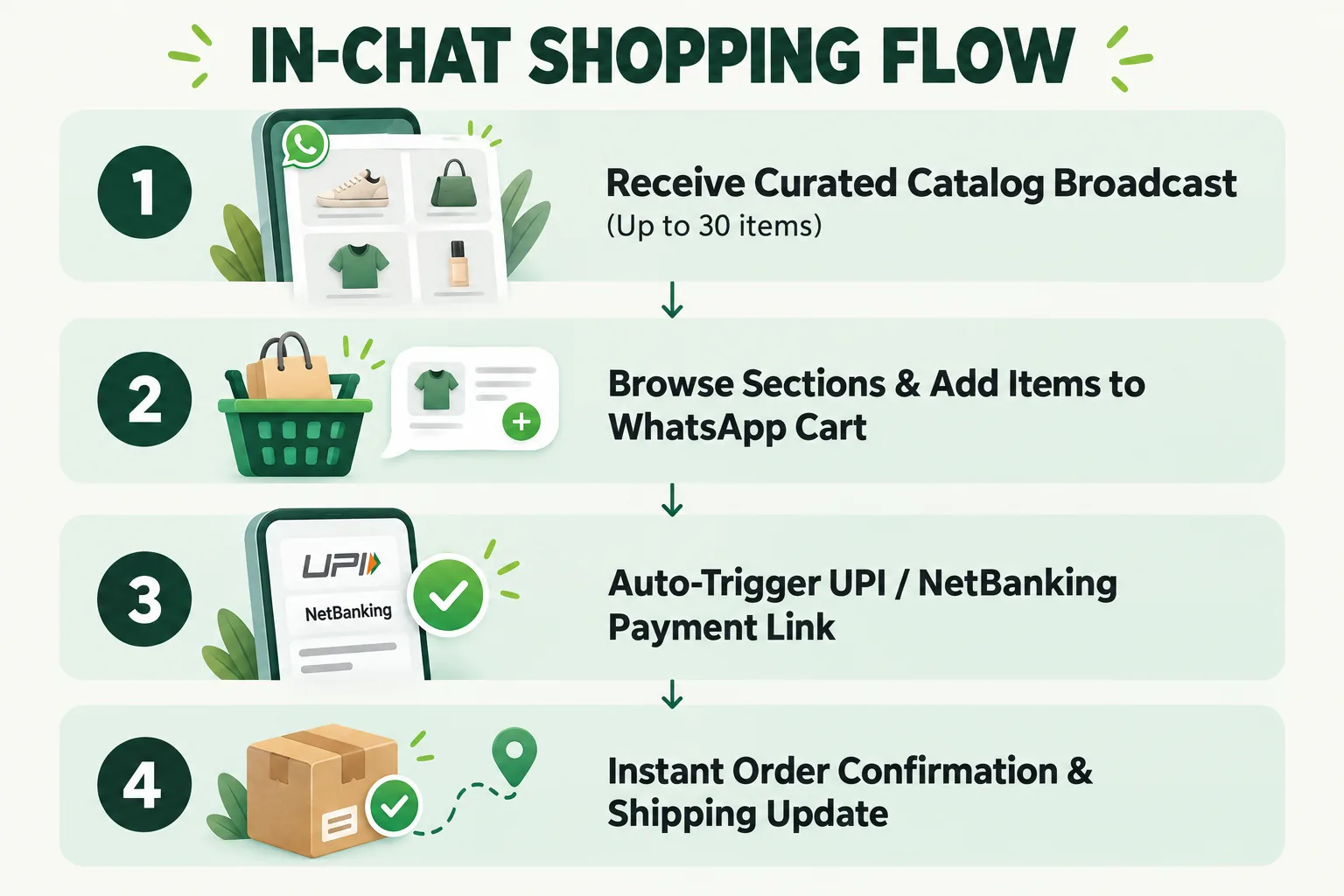
Browse, Select, Buy Without Leaving WhatsApp
- Interactive Discovery: Customers tap a single button ("View Items") to launch a full-screen product drawer without leaving WhatsApp.
- In-Chat Cart Building: Buyers select sizes, shades, or variants and build a basket directly within the interface.
- Frictionless Checkout Integration: When the customer taps "Send Order," the cart payload populates into the chat thread. Automated workflows instantly issue instant payment links (UPI, Google Pay, PhonePe, or Cards) to complete the transaction.
Syncing Your Catalog With Shopify or WooCommerce
Setting up catalog messaging does not require manual data entry:
- Automated Product Sync: Connect your primary e-commerce backend (Shopify, WooCommerce, Magento, or custom databases) directly to Meta Commerce Manager.
- Dynamic Inventory Control: Out-of-stock items are suppressed from interactive sends automatically, preventing customer disappointment and inventory mismatches.
To review official developer protocols and API guidelines for interactive product lists, consult the Meta WhatsApp Commerce Documentation.
What Early Adopters Are Seeing
Indian retail chains and fast-growing D2C fashion, beauty, and food brands deploying multi-product catalog flows report consistent growth across key conversion metrics:
- 3x Higher Add-to-Cart Rates: Interactive grid browsing converts significantly higher than traditional text links pointing to website landing pages.
- Lower Customer Acquisition Cost: Direct chat checkout shortens the sales cycle, improving conversion rates on paid Click-to-WhatsApp (CTWA) ad campaigns.
- Increased Average Order Value (AOV): Structured sections make cross-selling complementary products and bundled offers easy during a single chat session.
How to Launch Catalog Messaging on Wydely
Wydely simplifies catalog integration and conversational commerce deployment:
- Seamless Meta Commerce Sync: Sync your Shopify or inventory catalog with your WhatsApp Business API endpoint in just a few clicks.
- Automated Interactive Chatbots: Combine catalog delivery with intelligent conversational flows via our Chatbot Solutions to answer product questions and recommend personalized SKUs.
- Full Suite Overview: Explore every automation tool on the Wydely Features Page.
- Try the Free Message Generator: Create WhatsApp marketing messages quickly with Wydely’s free message generator. Try it to turn your product ideas into ready-to-use WhatsApp messages before launching your campaigns.
FAQs: WhatsApp Catalog Messages
Q1: Can we accept payments directly inside the WhatsApp conversation?
Yes. Once a customer submits their cart, automated integrations trigger localized payment gateways (such as Razorpay or PayU) or native UPI flows to collect payment immediately.
Q2: Do catalog messages require pre-approval as message templates?
Dynamic multi-product messages generated during active user sessions or triggered by automated chatbot flows do not require template pre-approval. Promotional catalog broadcasts initiated by the business use standard, pre-approved marketing template wrappers.