

WhatsApp Flows let businesses qualify leads and collect structured information directly inside WhatsApp, eliminating the need to send prospects to a separate landing page. Instead of making users switch from an Instagram or Facebook ad to a website, businesses can use interactive, multi-screen forms within the WhatsApp chat itself.
This reduces friction in the lead-generation journey and makes it easier for marketing teams to ask qualifying questions, collect customer details, and route high-intent prospects to sales. For users, the entire process happens within the familiar WhatsApp interface.
Quick Answer
WhatsApp Flows let a business collect a structured form, such as a lead qualification questionnaire or an appointment booking, entirely inside the chat window, removing the drop-off point of sending a customer to an external landing page.
What a Flow Actually Replaces
Traditionally, businesses used landing page forms or long chat conversations to collect lead information. WhatsApp Flows replace both with interactive forms that customers can complete directly inside the chat.
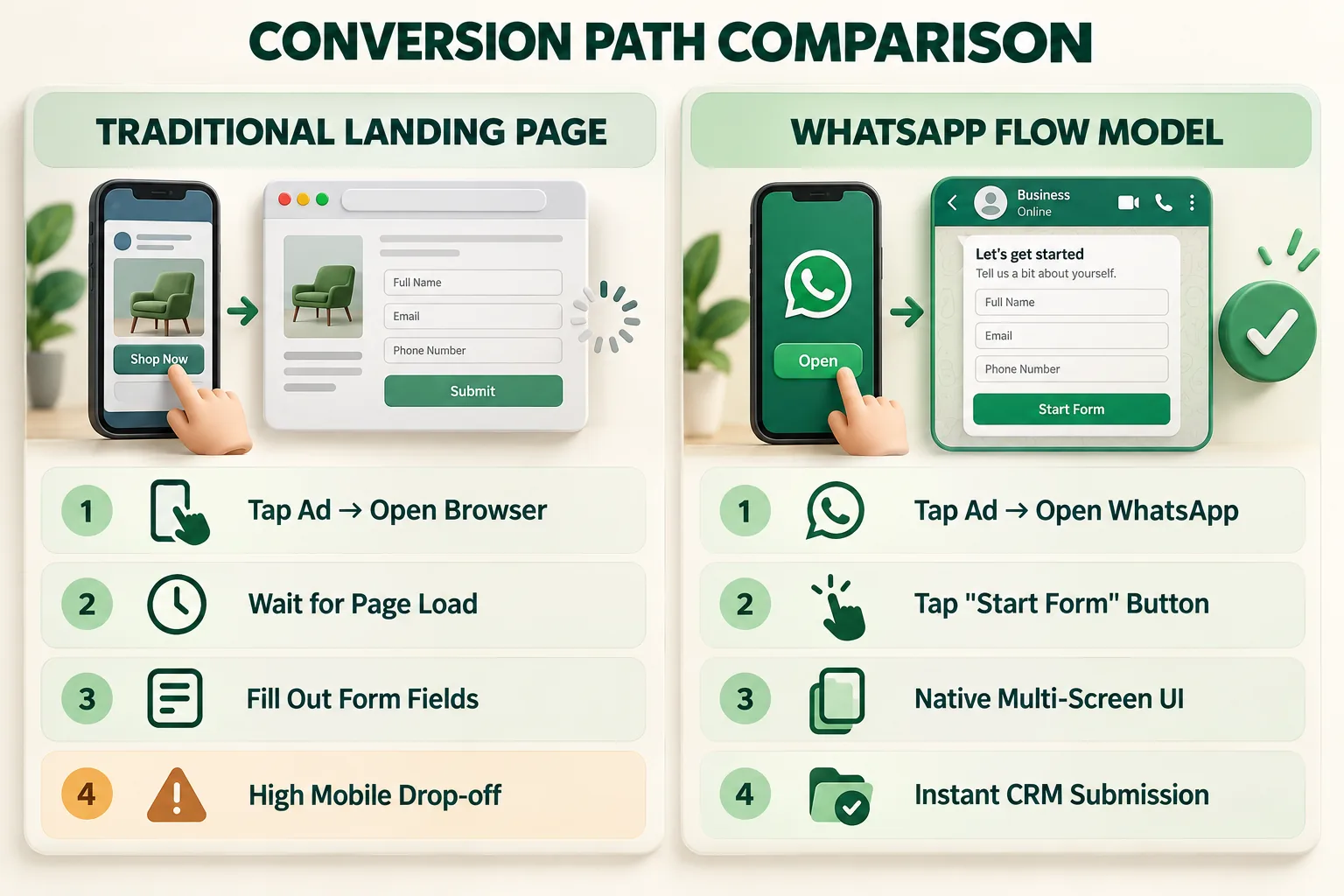
- Replaces Landing Pages: Customers stay inside WhatsApp instead of being sent to a separate website, reducing extra steps and drop-offs.
- Replaces Long Chat Questions: Use dropdowns, buttons, date pickers, and text fields to collect information in a simple, structured form.
- Reduces Manual Data Entry: Built-in field validation helps collect cleaner information, such as correctly formatted email addresses, phone numbers, and numeric responses, making the data easier to send to your CRM.
Building a Lead Qualification Flow Step by Step
Designing an effective lead qualification Flow requires balancing thorough data collection with an effortless user experience.
Screen Design and Question Order
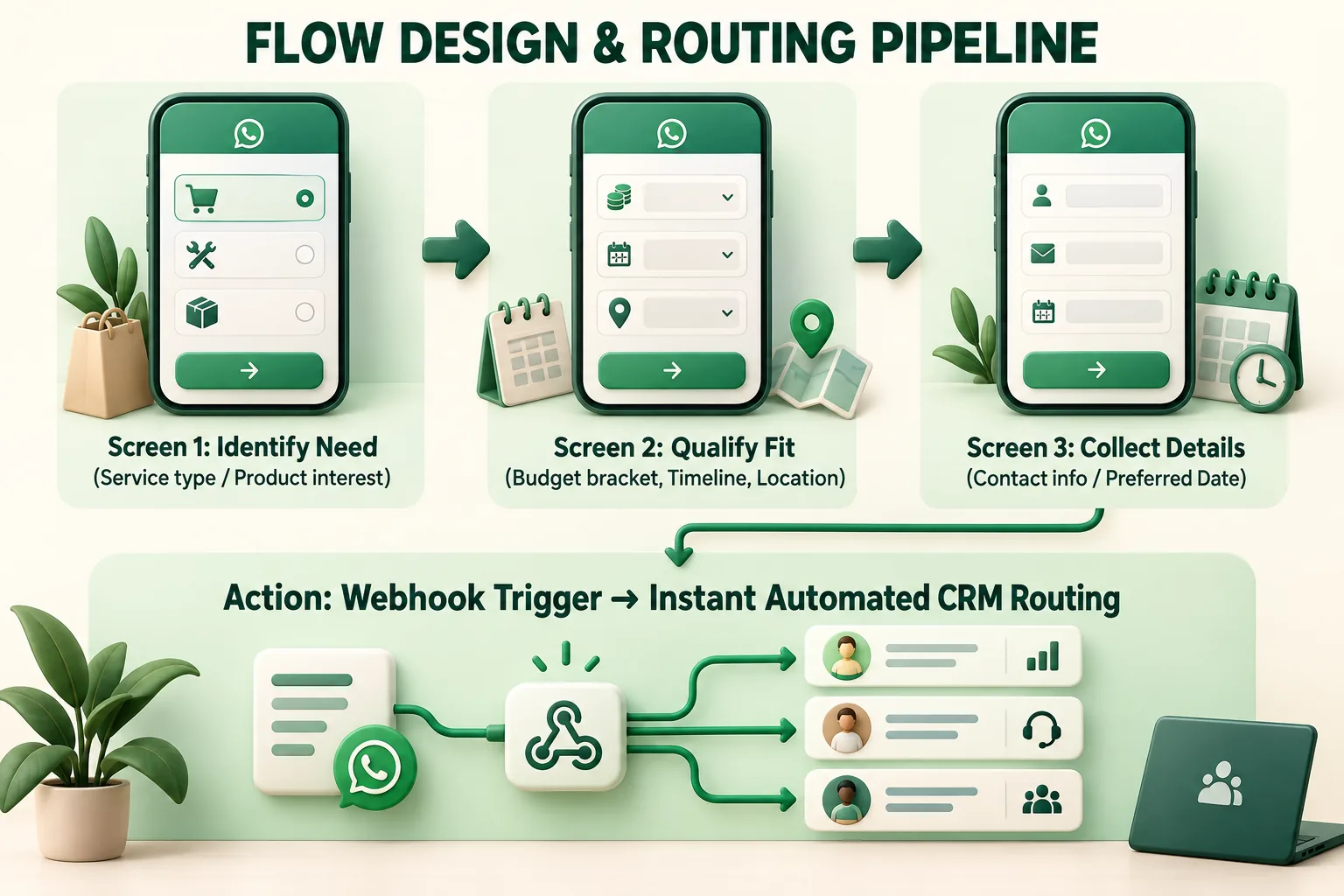
To keep completion rates high, keep your native Flow compressed into 2 to 3 logical screens with structured inputs:
- Screen 1 (Requirement & Scope): Lead with your primary qualifying metric (e.g., "What service are you looking for?" or "Select your preferred industry solution"). Use radio buttons or selectable list components for 1-tap responses.
- Screen 2 (Budget & Timeline): Collect parameters that determine lead urgency (e.g., budget range dropdowns or calendar date pickers for project kickoffs).
- Screen 3 (Contact & Confirmation): Auto-populate or verify name, company name, and email. Upon tapping "Submit," the data is immediately compiled into a single JSON payload.
Routing Qualified Leads to Sales
Once a prospect submits a Flow, the collected information can trigger the next step automatically based on their responses.
- High-Intent Leads: If a prospect matches your ideal budget, needs, or timeline, route the conversation to a sales representative or share a meeting booking option directly in WhatsApp.
- Nurture Leads: If a prospect is not ready to buy or falls outside your target criteria, move them into a nurture flow or share relevant product information without adding to the sales team's workload.
- Faster Lead Handoffs: Sales teams receive qualified leads with the key information already collected, so they can focus on the conversation instead of asking basic qualifying questions again.
To explore technical specifications, screen components, and JSON schemas, refer to the official Meta WhatsApp Flows Documentation.
Where Flows Beat a Standard Landing Page
For mobile-first growth campaigns, WhatsApp Flows outperform traditional landing page destinations across every major funnel metric:
Funnel Factor | Traditional Landing Page | WhatsApp Flows |
|---|---|---|
User Journey | Ad → browser → landing page → form | Ad/WhatsApp → in-chat Flow |
Page Load | Requires an external webpage to load | No external page required |
Form Experience | Web-based form with fields and buttons | Interactive in-chat fields such as dropdowns, buttons, and date pickers |
Data Collection | Form submissions require separate integration | Structured Flow responses can be received through the WhatsApp API/webhook |
Follow-Up | Often requires email, calls, or another channel | Customer remains in the WhatsApp conversation |
Best For | Longer forms, rich content and complex landing-page journeys | Short lead forms, qualification, bookings and structured data collection |
How Wydely's No-Code Flow Builder Works
Setting up custom WhatsApp Flows doesn't require complex JSON engineering or custom backend development:
- Drag-and-Drop Form Canvas: Easily construct multi-screen qualification logic, add input fields, set dynamic drop-down options, and preview screens in real-time.
- Automated CRM Sync: Connect your Flows directly to HubSpot, Salesforce, Zoho, or custom webhooks to update lead stages automatically. Explore these tools on our Wydely Features Page.
- Intelligent Conversational Bots: Integrate qualification Flows seamlessly into multi-agent support and automated bots via our Chatbot Solutions.
- Deploy Advanced Chat Workflows: Read our comprehensive guide on designing automated sequences in Interactive WhatsApp Chatbot Flows.
FAQs: WhatsApp Flows for Lead Qualification
Q1: Do users need to download anything or leave WhatsApp to complete a Flow?
No. WhatsApp Flows render natively within the WhatsApp chat interface on iOS, Android, and Web. The user never leaves the messaging application.
Q2: Can we pre-fill user information into a WhatsApp Flow screen?
Yes. If you already have existing CRM data for a returning prospect (such as their name or company), you can pass variables into the Flow payload to pre-fill specific form fields automatically.