

For Click-to-WhatsApp (CTWA) ads, Meta’s new attribution events help marketers connect ad clicks to WhatsApp chats and conversions, making it easier to measure true campaign ROAS. Previously, tracking what happened after a prospect started a WhatsApp chat was difficult because key conversion data was missing.
With referral data such as the ctwa_clid (Click-to-WhatsApp Click ID) and ad-level conversion signals, businesses can now better connect Meta ad interactions → WhatsApp chats → conversions and understand which campaigns are driving actual sales.
Quick Answer
Meta now fires a dedicated event when a user clicks a Click-to-WhatsApp ad, giving advertisers a way to attribute WhatsApp chats back to a specific ad rather than relying on last-click guesswork.
Why Click-to-WhatsApp Attribution Has Been a Blind Spot
Before stronger attribution options, tracking what happened after someone clicked a Click-to-WhatsApp ad was difficult. Marketers could see ad clicks in Meta Ads Manager and chats in WhatsApp, but connecting those chats to actual sales was not always straightforward.
- The Web-to-WhatsApp Gap: A user clicking a Facebook or Instagram ad and starting a WhatsApp chat moves from Meta’s ad environment into WhatsApp, making the full customer journey harder to track with standard web analytics.
- Limited Conversion Visibility: Marketers could track clicks and incoming WhatsApp chats, but linking a specific ad or creative to a purchase that happened later often required manual tracking.
- WhatsApp Chat Optimization: Without reliable downstream conversion signals, campaigns could focus more on generating WhatsApp chats than identifying which ads were driving qualified leads and sales.
What the New Ad-Click Event Reports
When someone clicks a Click-to-WhatsApp ad and starts a chat, Meta can pass referral details to your WhatsApp Business API endpoint. This gives marketers more context about where the chat came from.
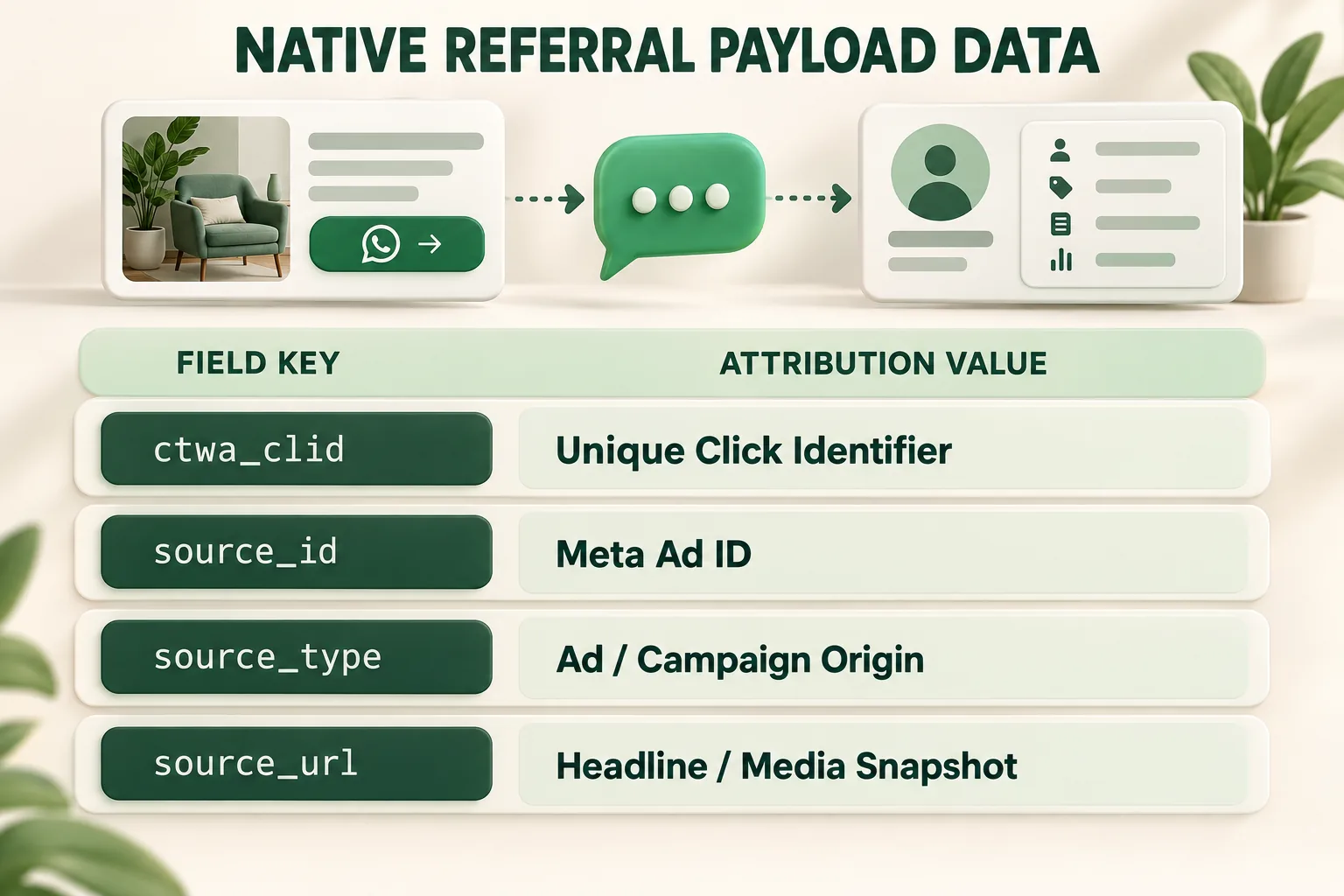
- ctwa_clid: A unique ID that identifies the Click-to-WhatsApp ad interaction.
- source_id: Identifies the Meta ad that triggered the WhatsApp chat, helping you connect the chat back to the campaign, ad set, and creative.
- Ad Context: Includes details about the ad or product the user clicked, helping businesses and chatbots understand what the customer is interested in.
For complete technical specifications on managing ad destinations and campaign objectives, review the official Meta Ads Manager Documentation.
Connecting the Event to Your CRM and Reporting Stack
To turn Click-to-WhatsApp data into actual conversion and revenue insights, your CRM needs to capture the ad-click details and connect them with later customer actions.
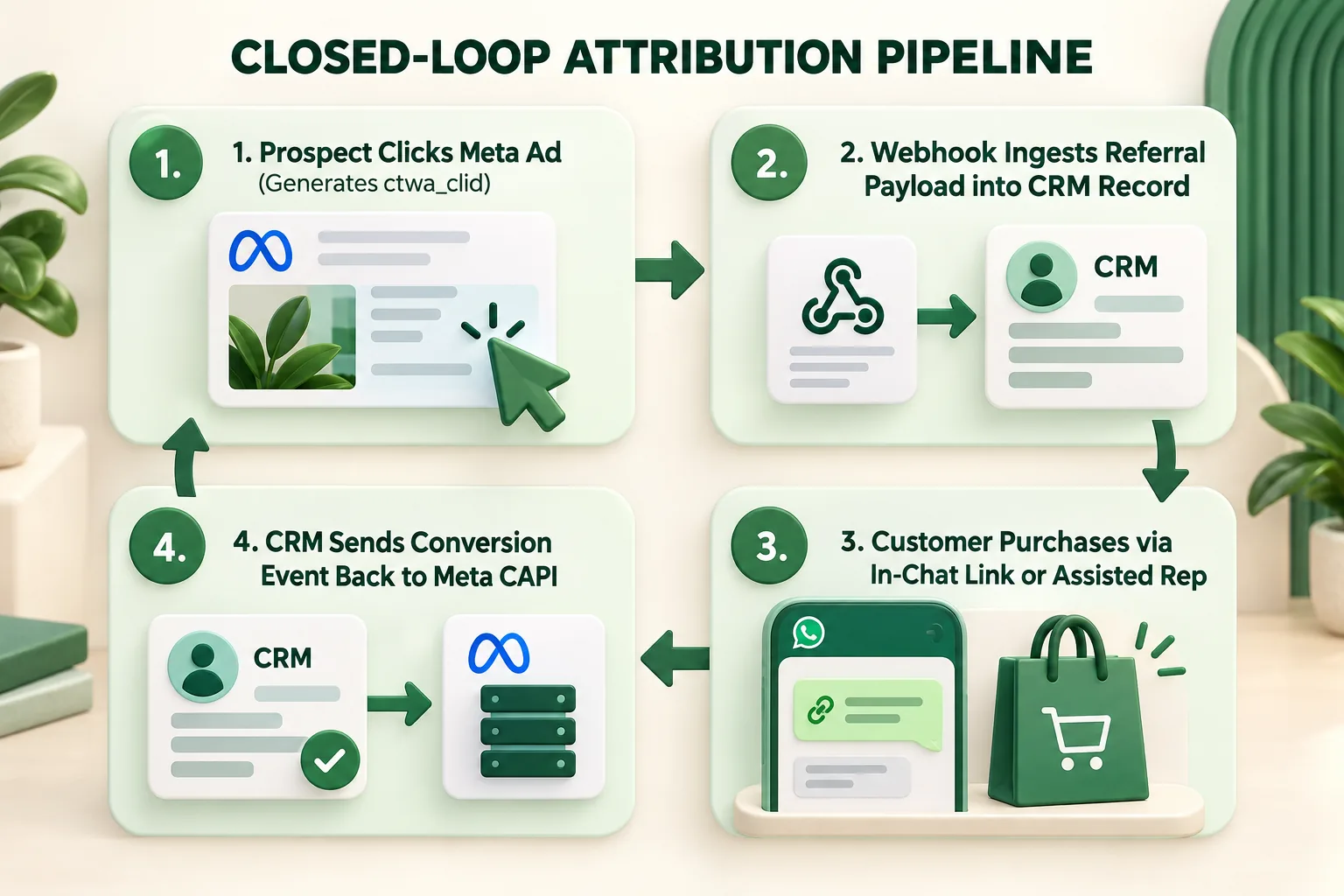
- Webhook Ingestion: Use your WhatsApp API webhook to collect the referral details, including ctwa_clid and source_id, when the customer starts a chat.
- Save It in Your CRM: Store these IDs with the customer’s profile, along with their BSUID or phone number, so the original ad can be linked to the customer later.
- Offline Event Feedback via CAPI: When the customer becomes a qualified lead, makes a purchase, or completes another important action, send the conversion event back to Meta through the Conversions API (CAPI).
A Simple Attribution Setup for a Performance Marketing Team
Building an end-to-end measurement setup does not require dedicated engineering overhead:
- Use Zero-Markup API Infrastructure: Deploy a WhatsApp Business Platform partner that natively captures and parses incoming Meta referral parameters.
- Map Revenue Attributions Seamlessly: Utilize built-in CRM sync tools on the Wydely Features Page to link chat orders directly to original campaigns.
- Track the Full Customer Journey: Connect WhatsApp conversations with your CRM, orders, and other customer actions to understand how CTWA campaigns contribute to qualified leads and sales.
- Measure WhatsApp ROI: Use the data alongside your campaign and revenue reports to move beyond message volume and evaluate the business outcomes generated by WhatsApp campaigns.
For a broader framework on measuring WhatsApp campaign performance, explore our guide to Measuring WhatsApp Marketing ROI.
FAQs: Click to WhatsApp Ad Attribution
Q1: Does ctwa_clid work if a user messages the business days after seeing the ad?
The referral object and ctwa_clid are attached directly to the first inbound message originating immediately from the ad click. Once recorded in your CRM, that attribution key remains tied to the lead record indefinitely for long-cycle sales.
Q2: Can we send offline purchase events back to Meta if the sale happened on a website or POS instead of inside WhatsApp?
Yes. As long as your CRM mapped the user's phone number or email to the captured ctwa_clid when the lead first entered WhatsApp, your backend can pass offline or web purchase events back to Meta via Conversions API (CAPI) for full multi-channel attribution.